Tutorial de Stack
Índice
- 1. Ejemplo de un proyecto (
helloword) - 2. Análisis del proyecto
- 3. Establecimiento de dependencias
- 4. Conjuntos de librerías organizadas (en inglés, curated)
- 5. Cambio de la versión del compilador con
resolver - 6. Trabajo con proyectos existentes
- 7. Selected lts-6.0
- 8. Diferentes bases de datos
- 9. Los sinónimos de
build - 10. Etiquetas, contextos y dependencias
- 11. Proyectos con múltiples librerías
- 12. Banderas y opciones de GHC
- 13. Camino (
path) - 14. Ejecución (
exec) - 15. El entorno interactivo (
ghci) - 16. ghc/runghc
- 17. Guiones
- 18. Búsqueda de la configuración de un proyecto
- 19. Ficheros stack.yaml vs .cabal
- 20. Comparación con otras herramientas
- 21. Más recursos
- 22. Otros rasgos de stack
- 23. Algunos comandos potentes
- 24. Depuración
Apuntes sobre la guía de Stack: The Haskell Tool Stack (User guide).
1 Ejemplo de un proyecto (helloword)
1.1 Inicio de un proyecto con stack new
- Ir al directorio
$HOME/Descargas
cd ~/Descargas
- Iniciar el proyecto con
~/Descargas> stack new helloworld new-template -p "year:2016"
- Se obtiene el siguiente mensaje
~/Descargas> stack new helloworld new-template -p "year:2016"
Downloading template "new-template" to create project "helloworld" in helloworld/ ...
Using cabal packages:
- helloworld/helloworld.cabal

Selecting the best among 7 snapshots...

* Selected lts-5.10

Initialising configuration using resolver: lts-5.10
Writing configuration to file: helloworld/stack.yaml
All done.
- Se ha creado el directorio
helloworldcon el proyecto. - Cambiar al directorio del proyecto
~/Descargas> cd helloworld
- Ver el contenido del proyecto
~/Descargas/helloworld> ls -lR
.:
total 28
drwxrwxr-x 2 4096 may 28 20:10 app
-rw-rw-r-- 1 1274 may 28 20:10 helloworld.cabal
-rw-rw-r-- 1 1526 may 28 20:10 LICENSE
-rw-rw-r-- 1   46 may 28 20:10 Setup.hs
drwxrwxr-x 2 4096 may 28 20:10 src
-rw-rw-r-- 1 1082 may 28 20:10 stack.yaml
drwxrwxr-x 2 4096 may 28 20:10 test

./app:
total 4
-rw-rw-r-- 1 61 may 28 20:10 Main.hs

./src:
total 4
-rw-rw-r-- 1 88 may 28 20:10 Lib.hs

./test:
total 4
-rw-rw-r-- 1 63 may 28 20:10 Spec.hs
1.2 Preparación del proyecto con stack setup
- Ejecutar
~/Descargas/helloworld> stack setup
stack will use a locally installed GHC
For more information on paths, see 'stack path' and 'stack exec env'
To use this GHC and packages outside of a project, consider using:
stack ghc, stack ghci, stack runghc, or stack exec
1.3 Construcción del proyecto con stack build
- Construir el proyecto
~/Descargas/helloworld> stack build
helloworld-0.1.0.0: configure
Configuring helloworld-0.1.0.0...
helloworld-0.1.0.0: build
Preprocessing library helloworld-0.1.0.0...
[1 of 1] Compiling Lib              ( src/Lib.hs, .stack-work/dist/x86_64-linux/Cabal-1.22.5.0/build/Lib.o )
In-place registering helloworld-0.1.0.0...
Preprocessing executable 'helloworld-exe' for helloworld-0.1.0.0...
[1 of 1] Compiling Main             ( app/Main.hs, .stack-work/dist/x86_64-linux/Cabal-1.22.5.0/build/helloworld-exe/helloworld-exe-tmp/Main.o )
Linking .stack-work/dist/x86_64-linux/Cabal-1.22.5.0/build/helloworld-exe/helloworld-exe ...
helloworld-0.1.0.0: copy/register
Installing library in
~/Descargas/helloworld/.stack-work/install/x86_64-linux/lts-5.10/7.10.3/lib/x86_64-linux-ghc-7.10.3/helloworld-0.1.0.0-LcmJCjfKuj651oaVRHuNpn
Installing executable(s) in
~/Descargas/helloworld/.stack-work/install/x86_64-linux/lts-5.10/7.10.3/bin
Registering helloworld-0.1.0.0...
- Comprobar que ha creado el ejecutable en
.stack-work/install/x86_64-linux/lts-5.10/7.10.3/bin
~/Descargas/helloworld> ls -l .stack-work/install/x86_64-linux/lts-5.10/7.10.3/bin
total 868
-rwxr-xr-x 1 884784 may 28 20:52 helloworld-exe
1.4 Ejecución el proyecto con stack exec
- La ejecución de proyecto es
~/Descargas/helloworld> stack exec helloworld-exe
someFunc
1.5 Comprobación del proyecto con stack test
- La comprobación es
~/Descargas/helloworld> stack test
helloworld-0.1.0.0: unregistering (components added: test:helloworld-test)
helloworld-0.1.0.0: build (lib + exe + test)
Preprocessing library helloworld-0.1.0.0...
In-place registering helloworld-0.1.0.0...
Preprocessing executable 'helloworld-exe' for helloworld-0.1.0.0...
Preprocessing test suite 'helloworld-test' for helloworld-0.1.0.0...
[1 of 1] Compiling Main             ( test/Spec.hs, .stack-work/dist/x86_64-linux/Cabal-1.22.5.0/build/helloworld-test/helloworld-test-tmp/Main.o )
Linking .stack-work/dist/x86_64-linux/Cabal-1.22.5.0/build/helloworld-test/helloworld-test ...
helloworld-0.1.0.0: copy/register
Installing library in
~/Descargas/helloworld/.stack-work/install/x86_64-linux/lts-5.10/7.10.3/lib/x86_64-linux-ghc-7.10.3/helloworld-0.1.0.0-LcmJCjfKuj651oaVRHuNpn
Installing executable(s) in
~/Descargas/helloworld/.stack-work/install/x86_64-linux/lts-5.10/7.10.3/bin
Registering helloworld-0.1.0.0...
helloworld-0.1.0.0: test (suite: helloworld-test)

Test suite not yet implemented

Completed 2 action(s).
- La construcción y comprobación recuerda lo anterior.
~/Descargas/helloworld> stack build
~/Descargas/helloworld> stack test
helloworld-0.1.0.0: test (suite: helloworld-test)


Test suite not yet implemented
2 Análisis del proyecto
2.1 Ficheros del proyecto helloworld
- Los ficheros del proyecto se obtienen con
~/Descargas/helloworld> find * -type f
app/Main.hs
helloworld.cabal
LICENSE
Setup.hs
src/Lib.hs
stack.yaml
test/Spec.hs
- El contenido de
Setup.hses
import Distribution.Simple
main = defaultMain
- El contenido de
stack.yamles
# For more information, see:
# http://docs.haskellstack.org/en/stable/yaml_configuration.html

# Specifies the GHC version and set of packages available (e.g., lts-3.5,
# nightly-2015-09-21, ghc-7.10.2)

resolver: lts-5.10

# Local packages, usually specified by relative directory name
packages:
- '.'

# Packages to be pulled from upstream that are not in the resolver (e.g.,
# acme-missiles-0.3)
extra-deps: []

# Override default flag values for local packages and extra-deps
flags: {}

# Extra package databases containing global packages
extra-package-dbs: []

# Control whether we use the GHC we find on the path
# system-ghc: true

# Require a specific version of stack, using version ranges
# require-stack-version: -any # Default
# require-stack-version: >= 1.0.0

# Override the architecture used by stack, especially useful on Windows
# arch: i386
# arch: x86_64

# Extra directories used by stack for building
# extra-include-dirs: [/path/to/dir]
# extra-lib-dirs: [/path/to/dir]

# Allow a newer minor version of GHC than the snapshot specifies
# compiler-check: newer-minor
- Explicación de algunos campos:
packages: indica los paquetes a construir (en nuestro caso, sólo uno que se encuentra en el directorio actual).resolver: indica con qué version de GHC construir el proyecto (en nuestro caso, con lalts-5.10; es decir con LTS Haskell version 5.10 (ghc-7.10.3)).
- El contenido de
helloworld.cabales
name:                helloworld
version:             0.1.0.0
synopsis:            Initial project template from stack
description:         Please see README.md
license:             BSD3
license-file:        LICENSE
category:            Development
build-type:          Simple
-- extra-source-files:
cabal-version:       >=1.10

library
  hs-source-dirs:      src
  exposed-modules:     Lib
  build-depends:       base >= 4.7 && < 5
  default-language:    Haskell2010

executable helloworld-exe
  hs-source-dirs:      app
  main-is:             Main.hs
  ghc-options:         -threaded -rtsopts -with-rtsopts=-N
  build-depends:       base
                     , helloworld
  default-language:    Haskell2010

test-suite helloworld-test
  type:                exitcode-stdio-1.0
  hs-source-dirs:      test
  main-is:             Spec.hs
  build-depends:       base
                     , helloworld
  ghc-options:         -threaded -rtsopts -with-rtsopts=-N
  default-language:    Haskell2010
2.2 El comando de configuración (setup).
- El comando
setupinstala la versión de GHC indicada enresolversi no lo estaba y lo indica en caso contrario. Por ejemplo,
~/Descargas/helloworld> stack setup
stack will use a locally installed GHC
For more information on paths, see 'stack path' and 'stack exec env'
To use this GHC and packages outside of a project, consider using:
stack ghc, stack ghci, stack runghc, or stack exec
- Se puede ver la version que usará con
~/Descargas/helloworld> stack exec which ghc
~/.stack/programs/x86_64-linux/ghc-7.10.3/bin/ghc
2.3 El comando de construcción (build)
- El comando
buildsirve para compilar, hacer tests, generar documentación, determinar dependencias y más.
3 Establecimiento de dependencias
- El contenido de
src/Lib.hses
module Lib
    ( someFunc
    ) where

someFunc :: IO ()
someFunc = putStrLn "someFunc"
- Vamos a cambiarlo para incluir la librería
Text:
{-# LANGUAGE OverloadedStrings #-}
module Lib
    ( someFunc
    ) where

import qualified Data.Text.IO as T

someFunc :: IO ()
someFunc = T.putStrLn "someFunc"
- Al intentar reconstruir el proyecto da un error
~/Descargas/helloworld> stack build
helloworld-0.1.0.0: unregistering (local file changes: src/Lib.hs)
helloworld-0.1.0.0: build
Preprocessing library helloworld-0.1.0.0...

~/Descargas/helloworld/src/Lib.hs:6:18:
    Could not find module ‘Data.Text.IO’
    It is a member of the hidden package ‘text-1.2.2.1@text_HmqVQnZSpjaC156ABqPhne’.
    Perhaps you need to add ‘text’ to the build-depends in your .cabal file.
    Use -v to see a list of the files searched for.

--  While building package helloworld-0.1.0.0 using:
      ~/.stack/setup-exe-cache/x86_64-linux/setup-Simple-Cabal-1.22.5.0-ghc-7.10.3 --builddir=.stack-work/dist/x86_64-linux/Cabal-1.22.5.0 build lib:helloworld exe:helloworld-exe --ghc-options " -ddump-hi -ddump-to-file"
    Process exited with code: ExitFailure 1
- El error se debe a que en el fichero
helloworld.cabalno se ha indicado que se usa la libreríahelloworld.cabal. La clave del mensaje anterior es
Could not find module ‘Data.Text.IO’
- La sección de librerías del proyecto de
helloworld.cabales
library
  hs-source-dirs:      src
  exposed-modules:     Lib
  build-depends:       base >= 4.7 && < 5
  default-language:    Haskell2010
- La cambiamos para añadir la librería
text
library
  hs-source-dirs:      src
  exposed-modules:     Lib
  build-depends:       base >= 4.7 && < 5
                     , text
  default-language:    Haskell2010
- Se reconstruye el proyecto
~/Descargas/helloworld> stack build
helloworld-0.1.0.0: configure
Configuring helloworld-0.1.0.0...
helloworld-0.1.0.0: build
Preprocessing library helloworld-0.1.0.0...
[1 of 1] Compiling Lib              ( src/Lib.hs, .stack-work/dist/x86_64-linux/Cabal-1.22.5.0/build/Lib.o )
In-place registering helloworld-0.1.0.0...
Preprocessing executable 'helloworld-exe' for helloworld-0.1.0.0...
[1 of 1] Compiling Main             ( app/Main.hs, .stack-work/dist/x86_64-linux/Cabal-1.22.5.0/build/helloworld-exe/helloworld-exe-tmp/Main.o ) [Lib changed]
Linking .stack-work/dist/x86_64-linux/Cabal-1.22.5.0/build/helloworld-exe/helloworld-exe ...
helloworld-0.1.0.0: copy/register
Installing library in
~/Descargas/helloworld/.stack-work/install/x86_64-linux/lts-5.10/7.10.3/lib/x86_64-linux-ghc-7.10.3/helloworld-0.1.0.0-0BMimtDiimKDb0KHx1qwH3
Installing executable(s) in
~/Descargas/helloworld/.stack-work/install/x86_64-linux/lts-5.10/7.10.3/bin
Registering helloworld-0.1.0.0...
- Como la librería estaba disponible, la ha usado sin necesidad de reinstalarla. En caso contrario, la instalaría.
3.1 Dependencias extras (extra-deps)
- Añadirle a
/src/Lib.hsel uso de la libreríaacme-missiles
{-# LANGUAGE OverloadedStrings #-}
module Lib
    ( someFunc
    ) where

import Acme.Missiles

someFunc :: IO ()
someFunc = launchMissiles
- Reconstruir el proyecto
~/Descargas/helloworld> stack build
helloworld-0.1.0.0: unregistering (local file changes: src/Lib.hs)
helloworld-0.1.0.0: build
Preprocessing library helloworld-0.1.0.0...

~/Descargas/helloworld/src/Lib.hs:6:8:
    Could not find module ‘Acme.Missiles’
    Use -v to see a list of the files searched for.

--  While building package helloworld-0.1.0.0 using:
      ~/.stack/setup-exe-cache/x86_64-linux/setup-Simple-Cabal-1.22.5.0-ghc-7.10.3 --builddir=.stack-work/dist/x86_64-linux/Cabal-1.22.5.0 build lib:helloworld exe:helloworld-exe --ghc-options " -ddump-hi -ddump-to-file"
    Process exited with code: ExitFailure 1
- Indica que no puede encontrar la librería
Acme.Missiles
Could not find module ‘Acme.Missiles’
- Añadir la librería
acme-missilesahelloworld.cabal
library
  hs-source-dirs:      src
  exposed-modules:     Lib
  build-depends:       base >= 4.7 && < 5
                     , text
                     , acme-missiles
  default-language:    Haskell2010
- Reconstruir el proyecto
~/Descargas/helloworld> stack build
While constructing the BuildPlan the following exceptions were encountered:

--  While attempting to add dependency,
    Could not find package acme-missiles in known packages

--  Failure when adding dependencies:
      acme-missiles: needed (-any), not present in build plan (latest applicable is 0.3)
    needed for package: helloworld-0.1.0.0

Recommended action: try adding the following to your extra-deps in ~/Descargas/helloworld/stack.yaml
- acme-missiles-0.3

You may also want to try the 'stack solver' command
- Indica que no encuentra la librería en las conocidas
Could not find package acme-missiles in known packages
- Recomienda añadirla a la sección
extra-depsdestack.yamlo cambiar la versión de GHC
Recommended action: try adding the following to your extra-deps in ~/Descargas/helloworld/stack.yaml
- acme-missiles-0.3

You may also want to try the 'stack solver' command
4 Conjuntos de librerías organizadas (en inglés, curated)
- El fallo anterior se debió a que
acme-missilesno está en el conjunto de librerias organizadas de lalts-5.10que es la versión con la que se está construyendo el proyecto. - Se puede añadir la librería a la sección
extra-depsdestack.yaml
extra-deps:
- acme-missiles-0.3
- Reconstruimos el proyecto
~/Descargas/helloworld> stack build
acme-missiles-0.3: configure
acme-missiles-0.3: build
acme-missiles-0.3: copy/register
helloworld-0.1.0.0: configure
Configuring helloworld-0.1.0.0...
helloworld-0.1.0.0: build
Preprocessing library helloworld-0.1.0.0...
[1 of 1] Compiling Lib              ( src/Lib.hs, .stack-work/dist/x86_64-linux/Cabal-1.22.5.0/build/Lib.o )
In-place registering helloworld-0.1.0.0...
Preprocessing executable 'helloworld-exe' for helloworld-0.1.0.0...
[1 of 1] Compiling Main             ( app/Main.hs, .stack-work/dist/x86_64-linux/Cabal-1.22.5.0/build/helloworld-exe/helloworld-exe-tmp/Main.o ) [Lib changed]
Linking .stack-work/dist/x86_64-linux/Cabal-1.22.5.0/build/helloworld-exe/helloworld-exe ...
helloworld-0.1.0.0: copy/register
Installing library in
~/Descargas/helloworld/.stack-work/install/x86_64-linux/lts-5.10/7.10.3/lib/x86_64-linux-ghc-7.10.3/helloworld-0.1.0.0-97KmdtaszZMLJ3WhwTyDHZ
Installing executable(s) in
~/Descargas/helloworld/.stack-work/install/x86_64-linux/lts-5.10/7.10.3/bin
Registering helloworld-0.1.0.0...
Completed 2 action(s).
- Observamos que ha instalado la librería
acme-missiles-0.3y compilado el proyecto, lts-5.10es una instantánea (en inglés, snapshot). En LTS Haskell version 5.10 (ghc-7.10.3)) se puede ver- El valor del resolvedor:
lts-5.10 - La versión de GHC: ghc-7.10.3
- Las librerias disponibles en esta instantánea: hay 1770.
- Búsquedas con Hoogle en dichas librerías.
- El valor del resolvedor:
- Se puede ver la lista de todas las instantáneas aquí.
- Hay dos tipos de intantáneas:
- con soporte (LTS) (del inglés, "Long Term Support")
- sin soporte (Nightly)
- Se recomienda el uso de las LTS.
5 Cambio de la versión del compilador con resolver
- Cambiamos en
stack.yamlla instantánea por lalts-6.0 - Reconstruimos el proyecto
~/Descargas/helloworld> stack build
Downloaded lts-6.0 build plan.
Caching build plan
text-1.2.2.1: using precompiled package
stm-2.4.4.1: using precompiled package
acme-missiles-0.3: configure
acme-missiles-0.3: build
acme-missiles-0.3: copy/register
helloworld-0.1.0.0: configure
Configuring helloworld-0.1.0.0...
helloworld-0.1.0.0: build
Preprocessing library helloworld-0.1.0.0...
In-place registering helloworld-0.1.0.0...
Preprocessing executable 'helloworld-exe' for helloworld-0.1.0.0...
Linking .stack-work/dist/x86_64-linux/Cabal-1.22.5.0/build/helloworld-exe/helloworld-exe ...
helloworld-0.1.0.0: copy/register
Installing library in
~/Descargas/helloworld/.stack-work/install/x86_64-linux/lts-6.0/7.10.3/lib/x86_64-linux-ghc-7.10.3/helloworld-0.1.0.0-97KmdtaszZMLJ3WhwTyDHZ
Installing executable(s) in
~/Descargas/helloworld/.stack-work/install/x86_64-linux/lts-6.0/7.10.3/bin
Registering helloworld-0.1.0.0...
Completed 4 action(s).
- Observamos que, en la nueva versión, ha añadido las librerías que hemos usado en el proyecto (text-1.2.2.1 y acme-missiles-0.3) y las de la nueva instantánea (stm-2.4.4.1).
- Se puede indicar la versión de la instantánea en línea
~/Descargas/helloworld> stack build --resolver nightly-2016-05-25
Downloaded nightly-2016-05-25 build plan.
Caching build plan
stm-2.4.4.1: using precompiled package
text-1.2.2.1: using precompiled package
acme-missiles-0.3: configure
acme-missiles-0.3: build
acme-missiles-0.3: copy/register
helloworld-0.1.0.0: configure
Configuring helloworld-0.1.0.0...
helloworld-0.1.0.0: build
Preprocessing library helloworld-0.1.0.0...
In-place registering helloworld-0.1.0.0...
Preprocessing executable 'helloworld-exe' for helloworld-0.1.0.0...
Linking .stack-work/dist/x86_64-linux/Cabal-1.22.5.0/build/helloworld-exe/helloworld-exe ...
helloworld-0.1.0.0: copy/register
Installing library in
~/Descargas/helloworld/.stack-work/install/x86_64-linux/nightly-2016-05-25/7.10.3/lib/x86_64-linux-ghc-7.10.3/helloworld-0.1.0.0-97KmdtaszZMLJ3WhwTyDHZ
Installing executable(s) in
~/Descargas/helloworld/.stack-work/install/x86_64-linux/nightly-2016-05-25/7.10.3/bin
Registering helloworld-0.1.0.0...
Completed 4 action(s).
- Se puede actualizar a
- la más actual con
--resolver nightly - la más actual de las soportadas con
--resolver lts - la más actual de las soportadas de la serie 2.X con
--resolver lts-2
- la más actual con
5.1 Cambio de versiones de GHCi
- Intento de construir el proyecto con la serie 0.X
~/Descargas/helloworld> stack --resolver lts-0 build
Selected resolver: lts-0.7
Downloaded lts-0.7 build plan.
Caching build plan
Compiler version mismatched, found ghc-7.10.2 (x86_64), but expected minor version match with ghc-7.8.3 (x86_64) (based on resolver setting in ~/Descargas/helloworld/stack.yaml).
Try running "stack setup" to install the correct GHC into ~/.stack/programs/x86_64-linux/
- Observamos que ha fallado porque no está instalada la versión 7.8.3 de GHC.
- Instalamos, usando la
--install-ghc, la versión requerida
~/Descargas/helloworld> stack --resolver lts-0 --install-ghc build
Selected resolver: lts-0.7
No information found for ghc-7.8.3.
Supported versions for OS key 'linux64':
   GhcVersion 7.8.4, GhcVersion 7.10.1, GhcVersion 7.10.2,
   GhcVersion 7.10.3, GhcVersion 8.0.1
- No la instala, porque no está entre las disponibles.
5.2 Valores de las instantáneas
nightly-YYYY-MM-DDes la del díaDDdel mesMMdel añoYYYY.lts-X.Yla versiónX.Yde las soportadas.ghc-X.Y.Zla versionX.Y.Zde GHC.
6 Trabajo con proyectos existentes
- Cambiamos al directorio
Descargas
~> cd ~/Descargas
- Importamos el proyecto
yackage
~/Descargas> stack unpack yackage-0.8.0
Unpacked yackage-0.8.0 to ~/Descargas/yackage-0.8.0/
- Cambiamos al directorio del proyecto
~/Descargas> cd yackage-0.8.0
- El contenido del directorio es
~/Descargas/yackage-0.8.0> ls -l
total 36
-rw-r--r-- 1  168 may 29 13:29 ChangeLog.md
-rw-r--r-- 1 1527 may 29 13:29 LICENSE
-rw-r--r-- 1  325 may 29 13:29 README.md
-rw-r--r-- 1   46 may 29 13:29 Setup.hs
-rw-r--r-- 1 1880 may 29 13:29 yackage.cabal
-rw-r--r-- 1 9047 may 29 13:29 yackage.hs
-rw-r--r-- 1 1660 may 29 13:29 yackage-upload.hs
- Se observa que no tiene el fichero
yack.yaml
6.1 Inicio del proyecto (con stack init)
- Se inicia con
stack init
~/Descargas/yackage-0.8.0> stack init
Using cabal packages:
- yackage.cabal

Selecting the best among 6 snapshots...

* Selected lts-6.0

Initialising configuration using resolver: lts-6.0
Writing configuration to file: stack.yaml
All done.
- Observamos que se ha creado
stack.yaml
~/Descargas/yackage-0.8.0> ls
ChangeLog.md  README.md  stack.yaml     yackage.hs
LICENSE       Setup.hs   yackage.cabal  yackage-upload.hs
- El trabajo de
stack inites buscar la instantánea que mejor se adapta al proyecto.
6.2 Dependencias externas
- Añadimos la librería
acme-missilesa las dependencias destack.yaml
extra-deps:
- acme-missiles-0.3
- Reiniciamos el proyecto
#+BEGINEXAMPLE ~/Descargas/yackage-0.8.0> stack init –force Using cabal packages:
- yackage.cabal
Selecting the best among 6 snapshots…
7 Selected lts-6.0
Initialising configuration using resolver: lts-6.0 Overwriting existing configuration file: stack.yaml All done. #+ENDEXAMPLE
- Si hubiese fallado se podría haber resuelto son
solver
~/Descargas/yackage-0.8.0> stack init --force --solver
Using cabal packages:
- yackage.cabal

Selecting the best among 6 snapshots...

* Selected lts-6.0

Initialising configuration using resolver: lts-6.0
Overwriting existing configuration file: stack.yaml
All done.
7.1 Exclusión de librerías
- Se pueden producir conflictos entre librerías.
- Se puede escribir en
stack.yamlpara solucionar el conflicto, eliminando librerías.
7.2 Usando una instantánea especifica
- Se pued especificar con
stack init --resolver RESOLVER
7.3 Instalación del compilador
- Se puede indicar con
--install-ghc
7.4 Misceláneas y diagnóstico
- Se puede
- precisar los paquete indicando los subdirectorios que los contienen.
- ignorar subdirectorios con
--ignore-subdirs
7.5 Refinando la configuración
- Se puede refinar la configuración con
stack solver
~/Descargas/yackage-0.8.0> stack solver
Using configuration file: stack.yaml
Using cabal packages:
- yackage.cabal

No changes needed to stack.yaml
8 Diferentes bases de datos
- Las bases de datos de un proyecto están en el directorio
.stack-work. Por ejemplo,
~/Descargas/yackage-0.8.0> cd ../helloworld/
~/Descargas/helloworld> ls .stack-work/install/x86_64-linux
lts-1.15  lts-2.22  lts-5.10  lts-6.0  nightly-2016-05-25
~/Descargas/helloworld> ls .stack-work/install/x86_64-linux/lts-5.10/
7.10.3
~/Descargas/helloworld> ls .stack-work/install/x86_64-linux/lts-5.10/7.10.3/
bin  doc  flag-cache  lib  pkgdb
~/Descargas/helloworld> ls -R .stack-work/install/x86_64-linux/lts-5.10/7.10.3/
.stack-work/install/x86_64-linux/lts-5.10/7.10.3/:
bin  doc  flag-cache  lib  pkgdb

.stack-work/install/x86_64-linux/lts-5.10/7.10.3/bin:
helloworld-exe

.stack-work/install/x86_64-linux/lts-5.10/7.10.3/doc:
helloworld-0.1.0.0

.stack-work/install/x86_64-linux/lts-5.10/7.10.3/doc/helloworld-0.1.0.0:
LICENSE

.stack-work/install/x86_64-linux/lts-5.10/7.10.3/flag-cache:
acme-missiles-0.3-66d3afc09e99cc3d3ba93c01cde67be6
helloworld-0.1.0.0-43d7498aa4d52aa4ba914b38f2b2d970
helloworld-0.1.0.0-56f099e419ffc27da2fbdc93e8cc1e84
helloworld-0.1.0.0-f5e5163488796c098c150f8de41f5e79

.stack-work/install/x86_64-linux/lts-5.10/7.10.3/lib:
x86_64-linux-ghc-7.10.3

.stack-work/install/x86_64-linux/lts-5.10/7.10.3/lib/x86_64-linux-ghc-7.10.3:
acme-missiles-0.3-DAH1oLSTISzIx4Z642Z9EI   helloworld-0.1.0.0-97KmdtaszZMLJ3WhwTyDHZ
helloworld-0.1.0.0-0BMimtDiimKDb0KHx1qwH3  helloworld-0.1.0.0-LcmJCjfKuj651oaVRHuNpn

.stack-work/install/x86_64-linux/lts-5.10/7.10.3/lib/x86_64-linux-ghc-7.10.3/acme-missiles-0.3-DAH1oLSTISzIx4Z642Z9EI:
Acme
libHSacme-missiles-0.3-DAH1oLSTISzIx4Z642Z9EI.a
libHSacme-missiles-0.3-DAH1oLSTISzIx4Z642Z9EI-ghc7.10.3.so

.stack-work/install/x86_64-linux/lts-5.10/7.10.3/lib/x86_64-linux-ghc-7.10.3/acme-missiles-0.3-DAH1oLSTISzIx4Z642Z9EI/Acme:
Missiles  Missiles.dyn_hi  Missiles.hi

.stack-work/install/x86_64-linux/lts-5.10/7.10.3/lib/x86_64-linux-ghc-7.10.3/acme-missiles-0.3-DAH1oLSTISzIx4Z642Z9EI/Acme/Missiles:
STM.dyn_hi  STM.hi

.stack-work/install/x86_64-linux/lts-5.10/7.10.3/lib/x86_64-linux-ghc-7.10.3/helloworld-0.1.0.0-0BMimtDiimKDb0KHx1qwH3:
Lib.dyn_hi  libHShelloworld-0.1.0.0-0BMimtDiimKDb0KHx1qwH3.a
Lib.hi      libHShelloworld-0.1.0.0-0BMimtDiimKDb0KHx1qwH3-ghc7.10.3.so

.stack-work/install/x86_64-linux/lts-5.10/7.10.3/lib/x86_64-linux-ghc-7.10.3/helloworld-0.1.0.0-97KmdtaszZMLJ3WhwTyDHZ:
Lib.dyn_hi  libHShelloworld-0.1.0.0-97KmdtaszZMLJ3WhwTyDHZ.a
Lib.hi      libHShelloworld-0.1.0.0-97KmdtaszZMLJ3WhwTyDHZ-ghc7.10.3.so

.stack-work/install/x86_64-linux/lts-5.10/7.10.3/lib/x86_64-linux-ghc-7.10.3/helloworld-0.1.0.0-LcmJCjfKuj651oaVRHuNpn:
Lib.dyn_hi  libHShelloworld-0.1.0.0-LcmJCjfKuj651oaVRHuNpn.a
Lib.hi      libHShelloworld-0.1.0.0-LcmJCjfKuj651oaVRHuNpn-ghc7.10.3.so

.stack-work/install/x86_64-linux/lts-5.10/7.10.3/pkgdb:
acme-missiles-0.3-66d3afc09e99cc3d3ba93c01cde67be6.conf   package.cache
helloworld-0.1.0.0-43d7498aa4d52aa4ba914b38f2b2d970.conf
- Las librerías estan en capas:
- la capa local (que son las anteriores),
- la de la instantánea y
- la de GHC.
- Se puede obtener la lista de librerías
~/Descargas/helloworld> stack exec ghc-pkg list
~/.stack/programs/x86_64-linux/ghc-7.10.3/lib/ghc-7.10.3/package.conf.d:
    Cabal-1.22.5.0
    array-0.5.1.0
    base-4.8.2.0
    bin-package-db-0.0.0.0
    binary-0.7.5.0
    rts-1.0
    bytestring-0.10.6.0
    containers-0.5.6.2
    deepseq-1.4.1.1
    directory-1.2.2.0
    filepath-1.4.0.0
    (ghc-7.10.3)
    ghc-prim-0.4.0.0
    haskeline-0.7.2.1
    hoopl-3.10.0.2
    hpc-0.6.0.2
    integer-gmp-1.0.0.0
    pretty-1.1.2.0
    process-1.2.3.0
    template-haskell-2.10.0.0
    terminfo-0.4.0.1
    time-1.5.0.1
    transformers-0.4.2.0
    unix-2.7.1.0
    xhtml-3000.2.1

~/.stack/snapshots/x86_64-linux/lts-6.0/7.10.3/pkgdb:
    stm-2.4.4.1
    text-1.2.2.1

~/Descargas/helloworld/.stack-work/install/x86_64-linux/lts-6.0/7.10.3/pkgdb:
    acme-missiles-0.3
    helloworld-0.1.0.0
- Se puede ver las instantáneas disponibles
~/Descargas/helloworld> ls ~/.stack/snapshots/x86_64-linux/
lts-1.15  lts-2.22  lts-3.4  lts-3.8   lts-6.0             nightly-2015-10-01
lts-2.14  lts-3.2   lts-3.5  lts-5.10  nightly-2015-09-04  nightly-2016-05-25
9 Los sinónimos de build
- La lista se puede obtener con
~/Descargas/helloworld> stack --help | grep build
  build                    Build the package(s) in this directory/configuration
  install                  Shortcut for 'build --copy-bins'
  test                     Shortcut for 'build --test'
  bench                    Shortcut for 'build --bench'
  haddock                  Shortcut for 'build --haddock'
  query                    Query general build information (experimental)
9.1 Instalación con copy y copy-bins
- Se puede ver el directorio de instalación, por defecto, con
~/Descargas/helloworld> stack path --local-bin-path
~/.local/bin
- Poniendo
~/.local/binen la variablePATHse podrán ejecutar los programas directamente.
10 Etiquetas, contextos y dependencias
- El comando
buildpermite muchas opciones. La sintaxis completa se encuentra en Build command. - Algunos ejemplos:
- indicar el nombre de una librería; p.e.
stack build vectorinstala la librería en alguna de las bases de datos (local, instantánea o global). - indicar la versión de una librería; p.e.
stack build yesod-bin-1.4.14 - indicar componente; p.e.
stack build helloworld:test:helloworld-testpara construir la componentehelloworld-testde la libreríahelloworldSe puede simplificar constack build :helloworld-test
- indicar el nombre de una librería; p.e.
10.1 Componentes, --test y --bench
- Se puede limpiar el proyecto
~/Descargas/helloworld> stack clean
- Se puede reconstruir
~/Descargas/helloworld> stack build
helloworld-0.1.0.0: unregistering (local file changes: app/Main.hs helloworld.cabal src/Lib.hs test/Spec.hs)

helloworld-0.1.0.0: configure
Configuring helloworld-0.1.0.0...
helloworld-0.1.0.0: build
Preprocessing library helloworld-0.1.0.0...
[1 of 1] Compiling Lib              ( src/Lib.hs, .stack-work/dist/x86_64-linux/Cabal-1.22.5.0/build/Lib.o )
In-place registering helloworld-0.1.0.0...
Preprocessing executable 'helloworld-exe' for helloworld-0.1.0.0...
[1 of 1] Compiling Main             ( app/Main.hs, .stack-work/dist/x86_64-linux/Cabal-1.22.5.0/build/helloworld-exe/helloworld-exe-tmp/Main.o )
Linking .stack-work/dist/x86_64-linux/Cabal-1.22.5.0/build/helloworld-exe/helloworld-exe ...
helloworld-0.1.0.0: copy/register
Installing library in
~/Descargas/helloworld/.stack-work/install/x86_64-linux/lts-6.0/7.10.3/lib/x86_64-linux-ghc-7.10.3/helloworld-0.1.0.0-97KmdtaszZMLJ3WhwTyDHZ
Installing executable(s) in
~/Descargas/helloworld/.stack-work/install/x86_64-linux/lts-6.0/7.10.3/bin
Registering helloworld-0.1.0.0...
- Se puede añadir los tests
~/Descargas/helloworld> stack build --test helloworld
helloworld-0.1.0.0: unregistering (components added: test:helloworld-test)
helloworld-0.1.0.0: build (lib + exe + test)
Preprocessing library helloworld-0.1.0.0...
In-place registering helloworld-0.1.0.0...
Preprocessing executable 'helloworld-exe' for helloworld-0.1.0.0...
Preprocessing test suite 'helloworld-test' for helloworld-0.1.0.0...
[1 of 1] Compiling Main             ( test/Spec.hs, .stack-work/dist/x86_64-linux/Cabal-1.22.5.0/build/helloworld-test/helloworld-test-tmp/Main.o )
Linking .stack-work/dist/x86_64-linux/Cabal-1.22.5.0/build/helloworld-test/helloworld-test ...
helloworld-0.1.0.0: copy/register
Installing library in
~/Descargas/helloworld/.stack-work/install/x86_64-linux/lts-6.0/7.10.3/lib/x86_64-linux-ghc-7.10.3/helloworld-0.1.0.0-97KmdtaszZMLJ3WhwTyDHZ
Installing executable(s) in
~/Descargas/helloworld/.stack-work/install/x86_64-linux/lts-6.0/7.10.3/bin
Registering helloworld-0.1.0.0...
helloworld-0.1.0.0: test (suite: helloworld-test)

Test suite not yet implemented

Completed 2 action(s).
- Las banderas
--testy--benchindican las componentes que se añadirán al proyecto, pero no su evaluación. - Se puede usar
--no-run-testsy--no-run-benchmarkspara no ejecutar las componentes.
11 Proyectos con múltiples librerías
- En un proyecto con múltiples librerías, las funcionalidades de stack son las mismas.
~/Descargas> mkdir multi
~/Descargas> cd multi
~/Descargas/multi> stack unpack wai-app-static-3.1.1 yackage-0.8.0
wai-app-static-3.1.1: download
Unpacked wai-app-static-3.1.1 to ~/Descargas/multi/wai-app-static-3.1.1/
Unpacked yackage-0.8.0 to ~/Descargas/multi/yackage-0.8.0/
~/Descargas/multi> stack init
Using cabal packages:
- wai-app-static-3.1.1/wai-app-static.cabal
- yackage-0.8.0/yackage.cabal

Selecting the best among 6 snapshots...

* Partially matches lts-6.0
    wai version 3.2.1.1 found
        - wai-app-static requires ==3.0.*
        - wai-app-static flags: print = False
    warp version 3.2.6 found
        - wai-app-static requires >=3.0.11 && <3.2
        - wai-app-static flags: print = False

* Partially matches lts-5.10
    wai version 3.2.0 found
        - wai-app-static requires ==3.0.*
        - wai-app-static flags: print = False
    warp version 3.2.2 found
        - wai-app-static requires >=3.0.11 && <3.2
        - wai-app-static flags: print = False

* Partially matches nightly-2016-05-25
    wai version 3.2.1.1 found
        - wai-app-static requires ==3.0.*
        - wai-app-static flags: print = False
    warp version 3.2.6 found
        - wai-app-static requires >=3.0.11 && <3.2
        - wai-app-static flags: print = False

Caching build plan
* Selected nightly-2015-10-01

Initialising configuration using resolver: nightly-2015-10-01
Writing configuration to file: stack.yaml
All done.
12 Banderas y opciones de GHC
12.1 Banderas de Cabal
- Se puede cambiar opciones de Cabal con
--flag; p.e.
stack build --flag yackage:-upload
12.2 Opciones de GHC
- Se pueden cambiar opciones de GHC; p.e.
stack build --ghc-options="-Wall -Werror"
13 Camino (path)
- Se pueden ver los caminos del proyecto
~/Descargas/multi> stack path
global-stack-root: ~/.stack
project-root: ~/Descargas/multi
config-location: ~/Descargas/multi/stack.yaml
bin-path: ~/.stack/snapshots/x86_64-linux/nightly-2015-10-01/7.10.2/bin:
          ~/.local/bin:
          ~/.cabal/bin:
          ~/bin:
          /usr/local/sbin:
          /usr/local/bin:
          /usr/sbin:
          /usr/bin:
          /sbin:
          /bin:
          /usr/games:
          /usr/local/games
ghc-paths: ~/.stack/programs/x86_64-linux
local-bin-path: ~/.local/bin
extra-include-dirs:
extra-library-dirs:
snapshot-pkg-db: ~/.stack/snapshots/x86_64-linux/nightly-2015-10-01/7.10.2/pkgdb
local-pkg-db: ~/Descargas/multi/.stack-work/install/x86_64-linux/nightly-2015-10-01/7.10.2/pkgdb
global-pkg-db: /usr/local/haskell/ghc-7.10.2-x86_64/lib/ghc-7.10.2/package.conf.d
ghc-package-path:
  ~/Descargas/multi/.stack-work/install/x86_64-linux/nightly-2015-10-01/7.10.2/pkgdb:
  ~/.stack/snapshots/x86_64-linux/nightly-2015-10-01/7.10.2/pkgdb:
  /usr/local/haskell/ghc-7.10.2-x86_64/lib/ghc-7.10.2/package.conf.d
snapshot-install-root: ~/.stack/snapshots/x86_64-linux/nightly-2015-10-01/7.10.2
local-install-root: ~/Descargas/multi/.stack-work/install/x86_64-linux/nightly-2015-10-01/7.10.2
snapshot-doc-root: ~/.stack/snapshots/x86_64-linux/nightly-2015-10-01/7.10.2/doc
local-doc-root: ~/Descargas/multi/.stack-work/install/x86_64-linux/nightly-2015-10-01/7.10.2/doc
dist-dir: .stack-work/dist/x86_64-linux/Cabal-1.22.4.0
local-hpc-root: ~/Descargas/multi/.stack-work/install/x86_64-linux/nightly-2015-10-01/7.10.2/hpc
- Las opciones de
stack pathse ven con
~/Descargas/multi> stack path --help
Usage: stack path [--global-stack-root] [--project-root] [--config-location]
                  [--bin-path] [--ghc-paths] [--local-bin-path]
                  [--extra-include-dirs] [--extra-library-dirs]
                  [--snapshot-pkg-db] [--local-pkg-db] [--global-pkg-db]
                  [--ghc-package-path] [--snapshot-install-root]
                  [--local-install-root] [--snapshot-doc-root]
                  [--local-doc-root] [--dist-dir] [--local-hpc-root] [--help]
  Print out handy path information

Available options:
  --global-stack-root      Global stack root directory
  --project-root           Project root (derived from stack.yaml file)
  --config-location        Configuration location (where the stack.yaml file is)
  --bin-path               PATH environment variable
  --ghc-paths              Installed GHCs (unpacked and archives)
  --local-bin-path         Local bin path where stack installs executables
  --extra-include-dirs     Extra include directories
  --extra-library-dirs     Extra library directories
  --snapshot-pkg-db        Snapshot package database
  --local-pkg-db           Local project package database
  --global-pkg-db          Global package database
  --ghc-package-path       GHC_PACKAGE_PATH environment variable
  --snapshot-install-root  Snapshot installation root
  --local-install-root     Local project installation root
  --snapshot-doc-root      Snapshot documentation root
  --local-doc-root         Local project documentation root
  --dist-dir               Dist work directory
  --local-hpc-root         Where HPC reports and tix files are stored
  --help                   Show this help text

Run 'stack --help' for global options that apply to all subcommands.
- Se pueden ver las versiones de GHC instaladas
~/Descargas/multi> ls $(stack path --ghc-paths)/*.installed
~/.stack/programs/x86_64-linux/ghc-7.10.3.installed
~/.stack/programs/x86_64-linux/ghc-7.8.4.installed
14 Ejecución (exec)
- Con
stack execse ejecutan programas. - El entorno donde se ejecutan los programas se ve con
~/Descargas/multi> stack exec env
CLUTTER_IM_MODULE=xim
COLUMNS=89
COMPIZ_BIN_PATH=/usr/bin/
COMPIZ_CONFIG_PROFILE=ubuntu
COMP_WORDBREAKS=

"'><;|&(:
DBUS_SESSION_BUS_ADDRESS=unix:abstract=/tmp/dbus-Ya78CbWQg5
DEFAULTS_PATH=/usr/share/gconf/ubuntu.default.path
DESKTOP_SESSION=ubuntu
DISPLAY=:0
EDITOR=/usr/bin/emacsclient
EMACS=t
GDMSESSION=ubuntu
GDM_LANG=es
GHC_PACKAGE_PATH=~/Descargas/multi/.stack-work/install/x86_64-linux/nightly-2015-10-01/7.10.2/pkgdb:~/.stack/snapshots/x86_64-linux/nightly-2015-10-01/7.10.2/pkgdb:/usr/local/haskell/ghc-7.10.2-x86_64/lib/ghc-7.10.2/package.conf.d
GIO_LAUNCHED_DESKTOP_FILE=~/.local/share/applications/emacs24.desktop
GIO_LAUNCHED_DESKTOP_FILE_PID=2682
GNOME_DESKTOP_SESSION_ID=this-is-deprecated
GNOME_KEYRING_CONTROL=/run/user/1000/keyring-VB89TM
GNOME_KEYRING_PID=1863
GPG_AGENT_INFO=/run/user/1000/keyring-VB89TM/gpg:0:1
GTK_IM_MODULE=ibus
GTK_MODULES=overlay-scrollbar:unity-gtk-module
HASKELL_DIST_DIR=.stack-work/dist/x86_64-linux/Cabal-1.22.4.0
HASKELL_PACKAGE_SANDBOX=~/.stack/snapshots/x86_64-linux/nightly-2015-10-01/7.10.2/pkgdb
HASKELL_PACKAGE_SANDBOXES=~/Descargas/multi/.stack-work/install/x86_64-linux/nightly-2015-10-01/7.10.2/pkgdb:~/.stack/snapshots/x86_64-linux/nightly-2015-10-01/7.10.2/pkgdb:
HOME=~
IM_CONFIG_PHASE=1
INSIDE_EMACS=24.3.1,comint
INSTANCE=
JOB=dbus
LANG=es_ES.UTF-8
LANGUAGE=es:en
LC_ADDRESS=es_ES.UTF-8
LC_IDENTIFICATION=es_ES.UTF-8
LC_MEASUREMENT=es_ES.UTF-8
LC_MONETARY=es_ES.UTF-8
LC_NAME=es_ES.UTF-8
LC_NUMERIC=es_ES.UTF-8
LC_PAPER=es_ES.UTF-8
LC_TELEPHONE=es_ES.UTF-8
LC_TIME=es_ES.UTF-8
LESSCLOSE=/usr/bin/lesspipe %s %s
LESSOPEN=| /usr/bin/lesspipe %s
LS_COLORS=
MANDATORY_PATH=/usr/share/gconf/ubuntu.mandatory.path
MATHEMATICA_HOME=/usr/local/Wolfram/Mathematica/10.3
PATH=~/Descargas/multi/.stack-work/install/x86_64-linux/nightly-2015-10-01/7.10.2/bin:~/.stack/snapshots/x86_64-linux/nightly-2015-10-01/7.10.2/bin:~/.local/bin:~/.cabal/bin:~/bin:/usr/local/sbin:/usr/local/bin:/usr/sbin:/usr/bin:/sbin:/bin:/usr/games:/usr/local/games
PWD=~/Descargas/multi
QT4_IM_MODULE=xim
QT_IM_MODULE=ibus
QT_QPA_PLATFORMTHEME=appmenu-qt5
SELINUX_INIT=YES
SESSION=ubuntu
SESSIONTYPE=gnome-session
SESSION_MANAGER=local/lulio:@/tmp/.ICE-unix/1997,unix/lulio:/tmp/.ICE-unix/1997
SHELL=/bin/bash
SHLVL=1
SSH_AUTH_SOCK=/run/user/1000/keyring-VB89TM/ssh
STACK_EXE=/usr/bin/stack
TERM=dumb
TERMCAP=
TEXINPUTS=.:/usr/local/lib/tex//:
TEXTDOMAIN=im-config
TEXTDOMAINDIR=/usr/share/locale/
UPSTART_SESSION=unix:abstract=/com/ubuntu/upstart-session/1000/1865
XAUTHORITY=~/.Xauthority
XDG_CONFIG_DIRS=/etc/xdg/xdg-ubuntu:/usr/share/upstart/xdg:/etc/xdg
XDG_CURRENT_DESKTOP=Unity
XDG_DATA_DIRS=/usr/share/ubuntu:/usr/share/gnome:/usr/local/share/:/usr/share/
XDG_MENU_PREFIX=gnome-
XDG_RUNTIME_DIR=/run/user/1000
XDG_SEAT=seat0
XDG_SEAT_PATH=/org/freedesktop/DisplayManager/Seat0
XDG_SESSION_ID=c2
XDG_SESSION_PATH=/org/freedesktop/DisplayManager/Session0
XDG_VTNR=7
XMODIFIERS=@im=ibus
_=/usr/bin/stack
- Las opciones de ejecución se ven con
~/Descargas/multi> stack exec --help
Usage: stack exec CMD [-- ARGS (e.g. stack ghc -- X.hs -o x)] ([--plain] |
                  [--[no-]ghc-package-path] [--[no-]stack-exe] [--package ARG])
                  [--help]
  Execute a command

Available options:
  --plain                  Use an unmodified environment (only useful with
                           Docker)
  --[no-]ghc-package-path  Enable/disable setting the GHC_PACKAGE_PATH variable
                           for the subprocess
  --[no-]stack-exe         Enable/disable setting the STACK_EXE environment
                           variable to the path for the stack executable
  --package ARG            Additional packages that must be installed
  --help                   Show this help text

Run 'stack --help' for global options that apply to all subcommands.
15 El entorno interactivo (ghci)
- Se puede activar el entorno interactivo
~/Descargas/multi> stack exec ghci
GHCi, version 7.10.2: http://www.haskell.org/ghc/  :? for help
ghci> 2+3
5
ghci> :q
Leaving GHCi.
16 ghc/runghc
- Se puede hacer con
stack ghcystack runghc
17 Guiones
- Se crea el guión
turtle.hscon el siguiente contenido
#!/usr/bin/env stack
-- stack --resolver lts-3.2 --install-ghc runghc --package turtle
{-# LANGUAGE OverloadedStrings #-}
import Turtle
main = echo "Hello World!"
- Se declara ejecutable
/tmp> chmod +x turtle.hs
- Se ejecuta
/tmp> ./turtle.hs
Hello World!
- Se vuelve a ejecutar y lo hace más rápido (porque tiene el contexto instalado).
17.1 Opciones del intérprete
- Se pueden escribir las opciones en varias líneas
#!/usr/bin/env stack
{- stack
  --resolver lts-3.2
  --install-ghc
  runghc
  --package turtle
-}

{-# LANGUAGE OverloadedStrings #-}
import Turtle
main = echo "Hello World!"
18 Búsqueda de la configuración de un proyecto
- La búsqueda de la configuración sigue los siguientes pasos:
- buscar una opción
--stack-yamlen llamada - buscar la variable global
STACK_YAML - buscar el fichero
stack.yamlen el directorio actual y sus ancestros.
- buscar una opción
- Se pueden usar configuraciones alternativas: p.e.
stack build --stack-yaml stack-7.8.yaml
- Se puede compilar ficheros sin construir proyectos con
stack ghc - Se puede crear ejecutables sin proyectos; p.e.
stack install pandoc
19 Ficheros stack.yaml vs .cabal
- Un proyecto puede tener varias librerías.
- Cada proyecto tiene un stack.yaml.
- Cada librería tiene un fichero .cabal.
- El fichero .cabal especifica las librerías de las que depende.
- El fichero stack.yaml especifica las librerías usables.
- El fichero .cabal especifica las componentes, módulos y banderas de la librería
- El fichero stack.yaml puede sobrescribir las banderas de las librerías.
- El fichero stack.yaml especifica las librerías que se incluyen en el proyecto.
20 Comparación con otras herramientas
- Stack y cabal-install comparte formato y ecosistema.
- Stack prefiere el uso de librerías organizadas (Stackage snapshots, LTS Haskell, Nightly, etc).
- Stack pretende garantizar que el comportamiento de
stack buildpermanezca estable frente futuras librerías de otros proyectos.
21 Más recursos
- Información con
stack:- Ayuda con
stack --help - Versión con
stack --version - Comportamiento detallado con
--verbose
- Ayuda con
- La página principal de Stack.
- La lista de correo de stack.
- La FAQ de stack.
- La wiki de stack.
- Otro tutorial de stack.
22 Otros rasgos de stack
22.1 Plantillas (Templates)
- Hay muchas plantillas para iniciar un proyecto. La lista se obtiene con
/tmp> stack templates
chrisdone
franklinchen
ghcjs
ghcjs-old-base
hakyll-template
haskeleton
hspec
new-template
quickcheck-test-framework
readme-lhs
rubik
scotty-hello-world
scotty-hspec-wai
servant
servant-0.4
servant-docker
simple
simple-hpack
simple-library
tasty-discover
tasty-travis
unicode-syntax-exe
unicode-syntax-lib
yesod-hello-world
yesod-minimal
yesod-mongo
yesod-mysql
yesod-postgres
yesod-postgres-fay
yesod-simple
yesod-sqlite
22.2 IDE
- Se integra stack en emacs con
stack-mode(que se instala conlist-packages).
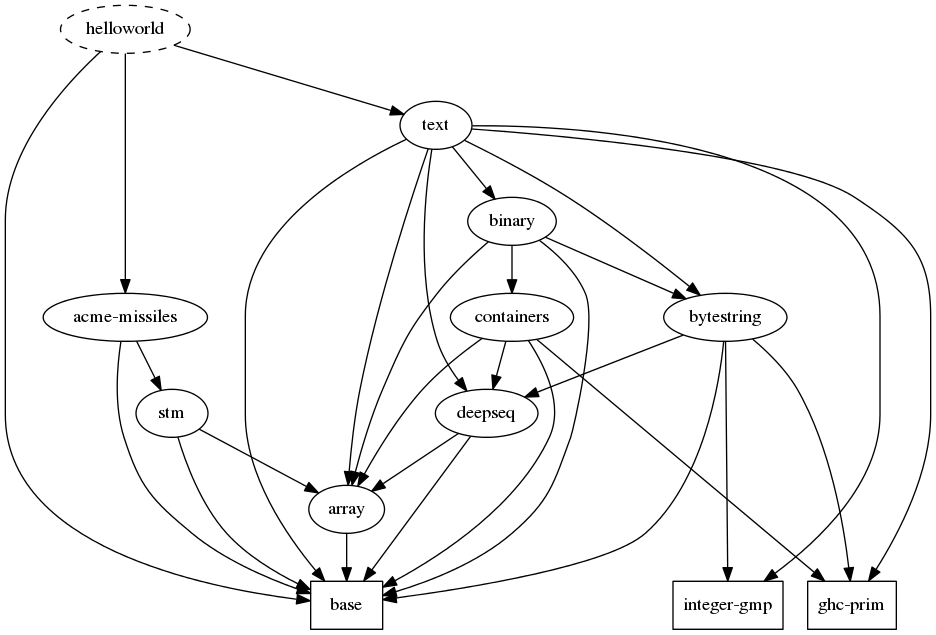
22.3 Visualización de dependencias
- Se puede calcular las dependencias con
stack doty verlas con Graphviz.
~/Descargas/helloworld> stack dot | dot -Tpng -o dep.png | eog dep.png
- se obtiene
- Se pueden ver las dependencias externas con
~/Descargas/helloworld> stack dot --external | dot -Tpng -o dep2.png | eog dep2.png
- Se obtiene
- Más información en Dependency visualization.
23 Algunos comandos potentes
stack updateactualiza el índice de librerías.stack unpackdescarga un proyecto comprimido y lo desempaqueta.stack sdistempaqueta una distribución del proyecto.stack uploadactualiza el proyecto en Hackage.stack upgradeconstruye una nueva versión de stack a partir de las fuentes.stack setup --upgrade-cabalactualiza la versión de Cabal.stack list-dependencieslista las librerías usadas en el proyecto.
24 Depuración
- Para instalar el proyecto con los perfiles habilitados
stack install --enable-executable-profiling --enable-library-profiling --ghc-options="-rtsopts"